A Base theme is a well-written set of CSS and template files
that a theme developer can make use of in a new custom theme.
Theme developers can make sub themes to override the default base theme. Some
of the popular base themes include Zen, Omegaand AdaptiveTheme

Drupal Interview Questions
Wednesday, April 16, 2014


Monday, April 14, 2014
54. What is drupal panels ?
The drupal panels is a
module in drupal which allows a drupal website administrator to create
customized layouts for multiple uses. At its core it is a drag and drop content
manager that lets you visually design a layout and place content within that
layout. Integration with other systems allows you to create nodes that use
this, landing pages that use this, and even override system pages such as
taxonomy and the node page so that you can customize the layout of your site
with very fine grained permissions.
Read more here https://drupal.org/project/panels
53. What is drupal 8 ?
The Most Customizable, Adaptable Drupal Release Ever, Drupal
8 will set a new standard for ease of use, while offering countless new ways to
tailor and deploy your content to the Web. Easily customize data structures,
listings, and pages, and take advantage of new capabilities for displaying data
on mobile devices, building APIs, and adapting to multilingual needs.
Important Points -
·
Mobile in
its DNA
Read more here https://drupal.org/drupal-8.0
52. How do you convert PSD to drupal theme ?
PSD files
are the raw photoshop files used to generate the graphics in a theme. You need
to convert the PSD to regular html/css theme, then you have to follow the steps
for creating a drupal theme.Know more about file system in drupal theme here http://drupal-interview-questions.blogspot.in/2011/12/50-which-are-files-in-typical-drupal.html
Tuesday, April 8, 2014
Drupal Interview Questions and Answers ( a set of 51 questions)
- 51. Explain Drupal User, Permission, Role in Drupa...
- 50. Which are the files in a typical drupal theme ...
- 49. Compare Joomla and Drupal Terminology
- 48. Name a few Good drupal sites.
- 47. What are the technical differences between Joo...
- 47. How to migrate your joomla site to Drupal site...
- 46. How to Install Themes in your drupal website
- 45. How to Create Content in Drupal ?
- 44. How URL Aliases works in Drupal ?
- 42. What is Content Construction Kit (CCK) in Drup...
- 41 The Drupal flow
- 43. Drupal Features / Drupal Benefits / Why Use Dr...
- 40. The search features in Drupal are excellent, a...
- 39. Drupal is flexible at handling events automati...
- 38. what a module is in Drupal and what the proces...
- 37. Which are the core optional modules in drupal ...
- 36. Is it possible to disable the core required mo...
- 35. Which are the core required modules in drupal ...
- 34. How to enable clean urls in drupal ?
- 33. What is PDO?
- 32. What are the browser requirements for Drupal ?...
- 31. What are systems requirements for drupal insta...
- 30. Explain the capabilities of views module.
- 29. How to port a joomla template to drupal ?
- 28. List the features of Drupal
- 27. What is difference between Diff and Patch
- 26. What is a patch?
- 25. How to post videos from mobile to Drupal websi...
- 24. List the SEO modules available in Drupal.
- 23. List the modules required for building a socia...
- 22. Explain the function and working of Dashboard ...
- 21. How To Define New Regions in Drupal
- 20. Explain Region, Block, Menu in drupal ..
- 19. Explain the path system of drupal ?
- 18 . How database system of drupal works ?
- 17 explain Taxonomy in drupal .
- 16. Concept of Comment in Drupal .
- 15. Explain the concept of node in drupal.
- 14. Explain User, Permission, Role in drupal.
- 13. What is a Module in drupal ?
- 12. How to interact with Drupal search system ?
- 11. Explain the menu system in Drupal ? Purpose of...
- 10 what is Database abstraction layer in Drupal ?
- 9. What are hooks in Drupal ?
- 8. Can I use Drupal on the command line?
- 7. Why are so many Drupal versions available - 4.x...
- 6. What are GNU Licenses ?
- 5. What is an Open source software ?
- 4. What is Drupal ?
- 3. Which are commonly used PHP based CMSs ?
- 2. What is a web content Management system ?
- 1. What is a CMS ?
Sunday, January 8, 2012
Top Drupal Modules for Search Engine Optimization (SEO)
The Below list is a comprehensive list of Drupal Modules for SEO. The list of drupal modules includes all the important Drupal SEO Modules. The drupal modules description can be viewed by clicking the title and modules can be downloaded directly from here by clicking on download link below each module overview. The Drupal SEO Modules list is not arranged in any order. Please feel free to suggest any other drupal modules which are important for Search Engine Optimization of drupal websites.
1. Pathauto
The Pathauto module automatically generates URL/path aliases for various kinds of content (nodes, taxonomy terms, users) without requiring the user to manually specify the path alias. This allows you to have URL aliases like /category/my-node-title instead of /node/123. The aliases are based upon a "pattern" system that uses tokens which the administrator can change.
Click here to Download Pathauto 7.x
Adds the Google Analytics web statistics tracking system to your website.
The module allows you to add the following statistics features to your site:
- Single/multi/cross domain tracking
- Selectively track/exclude certain users, roles and pages
- Monitor what type of links are tracked (downloads, outgoing and mailto)
- Monitor what files are downloaded from your pages
- Custom variables support with tokens
- Custom code snippets
- Site Search support
- AdSense support
- Tracking of Goals
- Anonymize visitors IP address
- Cache the Google Analytics code on your local server for improved page loading times
- Access denied (403) and Page not found (404) tracking
- DoNotTrack support (non-cached content only)
Click here to Download Google Analytics 7.x
3. Nodewords
This project allows you to add meta tags to Drupal pages, both manually and automatically based on various settings. Paying attention to meta tags, such as keywords, description and canonical URL, may help obtain better search engine positioning.
Click here to Download Nodewords 6.x
GlobalRedirect is a simple module which…
- Checks the current URL for an alias and does a 301 redirect to it if it is not being used.
- Checks the current URL for a trailing slash, removes it if present and repeats check 1 with the new request.
- Checks if the current URL is the same as the
site_frontpageand redirects to the frontpage if there is a match. - Checks if the Clean URLs feature is enabled and then checks the current URL is being accessed using the clean method rather than the 'unclean' method.
- Checks access to the URL. If the user does not have access to the path, then no redirects are done. This helps avoid exposing private aliased node's.
- Make sure the case of the URL being accessed is the same as the one set by the author/administrator. For example, if you set the alias "articles/cake-making" to node/123, then the user can access the alias with any combination of case.
- Most of the above options are configurable in the settings page. In Drupal 5 you can access this after enabling the
globalredirect_adminmodule. In Drupal 6, the settings page is bundled into the module
Click here to Download Global redirect 7.x
5. Page title
The word "title" is a bit overloaded. Every piece of content in Drupal has a title, and so does every page. The page title is the one found in the HTML head inside the
Saturday, January 7, 2012
Drupal SEO Modules
Top Drupal Modules for Search Engine Optimization (SEO)
The Below list is a comprehensive list of Drupal Modules for SEO. The list of drupal modules includes all the important Drupal SEO Modules. The drupal modules description can be viewed by clicking the title and modules can be downloaded directly from here by clicking on download link below each module overview. The Drupal SEO Modules list is not arranged in any order. Please feel free to suggest any other drupal modules which are important for Search Engine Optimization of drupal websites.
1. Pathauto
The Pathauto module automatically generates URL/path aliases for various kinds of content (nodes, taxonomy terms, users) without requiring the user to manually specify the path alias. This allows you to have URL aliases like /category/my-node-title instead of /node/123. The aliases are based upon a "pattern" system that uses tokens which the administrator can change.
Click here to Download Pathauto 7.x
Adds the Google Analytics web statistics tracking system to your website.
The module allows you to add the following statistics features to your site:
- Single/multi/cross domain tracking
- Selectively track/exclude certain users, roles and pages
- Monitor what type of links are tracked (downloads, outgoing and mailto)
- Monitor what files are downloaded from your pages
- Custom variables support with tokens
- Custom code snippets
- Site Search support
- AdSense support
- Tracking of Goals
- Anonymize visitors IP address
- Cache the Google Analytics code on your local server for improved page loading times
- Access denied (403) and Page not found (404) tracking
- DoNotTrack support (non-cached content only)
Click here to Download Google Analytics 7.x
3. Nodewords
This project allows you to add meta tags to Drupal pages, both manually and automatically based on various settings. Paying attention to meta tags, such as keywords, description and canonical URL, may help obtain better search engine positioning.
Click here to Download Nodewords 6.x
GlobalRedirect is a simple module which…
- Checks the current URL for an alias and does a 301 redirect to it if it is not being used.
- Checks the current URL for a trailing slash, removes it if present and repeats check 1 with the new request.
- Checks if the current URL is the same as the
site_frontpageand redirects to the frontpage if there is a match. - Checks if the Clean URLs feature is enabled and then checks the current URL is being accessed using the clean method rather than the 'unclean' method.
- Checks access to the URL. If the user does not have access to the path, then no redirects are done. This helps avoid exposing private aliased node's.
- Make sure the case of the URL being accessed is the same as the one set by the author/administrator. For example, if you set the alias "articles/cake-making" to node/123, then the user can access the alias with any combination of case.
- Most of the above options are configurable in the settings page. In Drupal 5 you can access this after enabling the
globalredirect_adminmodule. In Drupal 6, the settings page is bundled into the module
Click here to Download Global redirect 7.x
5. Page title
The word "title" is a bit overloaded. Every piece of content in Drupal has a title, and so does every page. The page title is the one found in the HTML head inside the tag. It is also used on SERPs (Search Engine Result Pages) and can greatly enhance your websites SEO (Search Engine Optimization).</p>
<p style="border-top-width: 0px; border-right-width: 0px; border-bottom-width: 0px; border-left-width: 0px; border-style: initial; border-color: initial; border-image: initial; background-image: initial; background-attachment: initial; background-origin: initial; background-clip: initial; background-color: rgb(255, 255, 255); font-size: 13px; margin-top: 0px; margin-right: 0px; margin-bottom: 0.692em; margin-left: 0px; padding-top: 0px; padding-right: 0px; padding-bottom: 0px; padding-left: 0px; vertical-align: baseline; color: rgb(34, 34, 34); font-family: 'Lucida Grande', 'DejaVu Sans', 'Bitstream Vera Sans', Verdana, Arial, sans-serif; line-height: 18px; text-align: -webkit-auto; ">
This module gives you granular control over the page title. You can specify patterns for how the title should be structured and, on content creation pages, specify the page title separately to the content's title.</p>
<p style="border-top-width: 0px; border-right-width: 0px; border-bottom-width: 0px; border-left-width: 0px; border-style: initial; border-color: initial; border-image: initial; background-image: initial; background-attachment: initial; background-origin: initial; background-clip: initial; background-color: rgb(255, 255, 255); font-size: 13px; margin-top: 0px; margin-right: 0px; margin-bottom: 0.692em; margin-left: 0px; padding-top: 0px; padding-right: 0px; padding-bottom: 0px; padding-left: 0px; vertical-align: baseline; color: rgb(34, 34, 34); font-family: 'Lucida Grande', 'DejaVu Sans', 'Bitstream Vera Sans', Verdana, Arial, sans-serif; line-height: 18px; text-align: -webkit-auto; ">
<br /></p>
<p style="border-top-width: 0px; border-right-width: 0px; border-bottom-width: 0px; border-left-width: 0px; border-style: initial; border-color: initial; border-image: initial; background-image: initial; background-attachment: initial; background-origin: initial; background-clip: initial; background-color: rgb(255, 255, 255); font-size: 13px; margin-top: 0px; margin-right: 0px; margin-bottom: 0.692em; margin-left: 0px; padding-top: 0px; padding-right: 0px; padding-bottom: 0px; padding-left: 0px; vertical-align: baseline; color: rgb(34, 34, 34); font-family: 'Lucida Grande', 'DejaVu Sans', 'Bitstream Vera Sans', Verdana, Arial, sans-serif; line-height: 18px; text-align: -webkit-auto; ">
Click here to <a href="http://ftp.drupal.org/files/projects/page_title-7.x-2.5.tar.gz">Download Drupal SEO Module Page Title 7.x</a></p>
<p>
</p>
<p>
</p>
</div>
</div>
6. SEO Checklist
7.Drupal SEO Tools
Saturday, December 17, 2011
51. Explain Drupal User, Permission, Role in Drupal
Every visitor to your drupal site, whether they have an account and log in or visit the site anonymously, is considered a user to Drupal. Each drupal user has a numeric user ID, and non-anonymous users also have a user name and an email address. Other information can also be associated with drupal users by modules; for instance, if you use the core Profile Drupal module, you can define user profile fields to be associated with each drupal user.
Anonymous drupal users have a user ID of zero (0). The drupal user with user ID one (1), which is the user account you create when you install Drupal, is special: that user has permission to do absolutely everything on the site.
Other users on your site can be assigned permissions via roles. To do this, you first need to create a role, which you might call "Content editor" or "Member". Next, you will assign permissions to that role, to tell Drupal what that role can and can't do on the site. Finally, you will grant certain users on your site your new role, which will mean that when those users are logged in, Drupal will let them do the actions you gave that role permission to do.
You can also assign permissions for the special built-in roles of "anonymous user" (a user who is not logged in) and "authenticated user" (a user who is logged in, with no special role assignments). Drupal permissions are quite flexible -- you are allowed to assign permission for any task to any role, depending on the needs of your site.
Saturday, December 10, 2011
50. Which are the files in a typical drupal theme and their purpose
A drupal theme is a collection of files that define the presentation layer. You can also create one or more "sub-themes" or variations on a drupal theme. Only the .info file is required, but most themes and sub-themes will use other files as well. The following diagram illustrates the files that are found in a typical drupal theme and sub-theme.
DRUPAL 6
 DRUPAL 7
DRUPAL 6
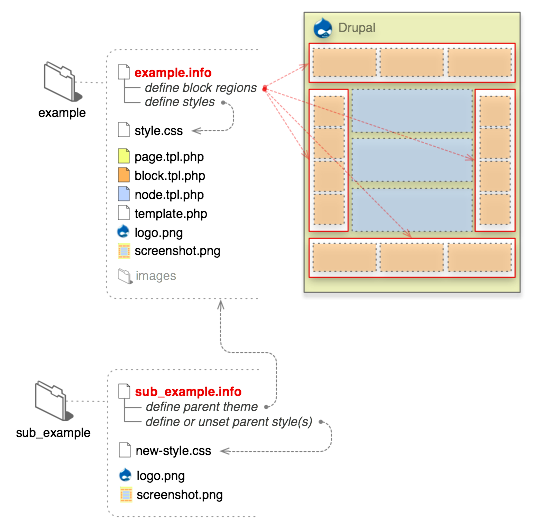 DRUPAL 7

- .info (required)
-
All that is required for Drupal to see your theme is a ".info" file. Should the theme require them, meta data, style sheets, JavaScripts, block regions and more can be defined here. Everything else is optional in drupal theme.
The internal name of the theme is also derived from this file. For example, if it is named "drop.info", then Drupal will see the name of the theme as "drop". Drupal 5 and below used the name of the enclosing folder of the theme.
Info files for themes are new in Drupal 6. In version 5, .info files were used solely for drupal modules.
- template files (.tpl.php)
-
These drupal templates are used for the (x)HTML markup and PHP variables. In some situations they may output other types of data --xml rss for example. Each .tpl.php file handles the output of a specific themable chunk of data, and in some situations it can handle multiple .tpl.php files through suggestions. They are optional, and if none exists in your drupal theme it will fall back to the default output. Refrain from having complex logic in these files. In most cases, it should be straight (x)HTML tags and PHP variables. A handful of these templates exist in directories where core and contributed modules exist. Copying them to your drupal theme folder will force Drupal to read your version.
Note: The theme registry caches information about the available theming data. You must reset it when adding or removing template files or theme functions from your theme.
- template.php
-
For all the conditional logic and data processing of the output, there is the template.php file. It is not required, but to keep the .tpl.php files tidy it can be used to hold preprocessors for generating variables before they are merged with the markup inside .tpl.php files. Custom functions, overriding theme functions or any other customization of the raw output should also be done here. This file must start with a PHP opening tag "
- Sub-themes
-
On the surface, sub-themes behave just like any other drupal theme. The only differences is that they inherit the resources from their parent themes. To create one, a "base theme" entry inside the .info file is needed. From there it will inherit the resources from its parent theme. There can be multiple levels of inheritance; i.e., a sub-theme can declare another sub-theme as its base. There are no hard set limits to this.
Drupal 5 and below required sub-themes to be in sub-directories of the parent theme. This is no longer the case.
- Others
-
- The logo and screen shot is not absolutely necessary for the theme to function, but it is recommended, especially if you are contributing your theme to the Drupal repository. Screenshots will show inside the theme administration page and the user account settings for selecting themes when the appropriate permissions are set. See the screenshot guidelines for more information.
- To supply administrative UI settings or "features" beyond logo, search, mission, etc., a "theme-settings.php" file can be used. This is an advanced feature. More information can be found in the Advanced settings handbook page.
- For color module support, a "color" directory with a "color.inc" file is needed along with various support files.
- If you want to base your work on a core theme, use sub-theming or make a copy and rename the theme. Directly modifying Bartik, Garland or Minnelli is strongly discouraged, since they are used for the install and upgrade process.
- All non-Core or modifications to Core themes should be installed under the "sites/all/themes" directory to keep them separate from core files. If you plan to run multiple sites from a single Drupal code base, you can make a theme available to a specific site rather than all sites; read about how to set this up in Multi-site installations.
49. Compare Joomla and Drupal Terminology
- Joomla
Template
is calledTheme
in Drupal. - Component = Module.
- Module = Block.
- Mambot/Plugin = Input filter.
- Menu-Horizontal = Primary Links
- Menu-Vertical = Navigation
- Dynamic Content Item = Story
- Static Content = Page
- Back-end = there is no back-end in Drupal,
- SEF = Clean URLs (but some docs refer to SEF, too).
- Section = Taxonomy Vocabulary/Term
- Section Title = Taxonomy Term (master)
- Category = Taxonomy Term (child)
- Introtext = Teaser
- Maintext = Body (see explanation below)
- Pathway = Breadcrumb
Other terms are the same, such as: forum discussion, editor, search, region, comment, subject/title, preview, html tag, view, edit, advertising/banner, log in/log out, profile, avatar, access control, logs, cache, site maintenance, RSS feed, parent-child and snippets.
Subscribe to:
Posts (Atom)